Claude 3.7 Sonnet vs. Grok 3 vs. o3-mini-high: Coding comparison
SAShrijal Acharya·February 27, 2025 (1 year ago)
66 reactions21 comments
javascript
python
ai
opensource
For a couple of weeks now, the tech community has been getting surprised by all these new AI models hitting the market every few days.
But here's the issue: most devs aren’t sure which AI model to use when it comes to working with code on a daily basis.
Just a few days ago, Anthropic released their most intelligent hybrid reasoning model yet, which they claim to be the best for coding.

But let’s see how it compares against two of our finest models, Grok 3 and o3-mini-high.
TL;DR
If you want to jump straight to the conclusion, when compared against these three models, Claude 3.7 Sonnet is the clear winner when it comes to writing code.
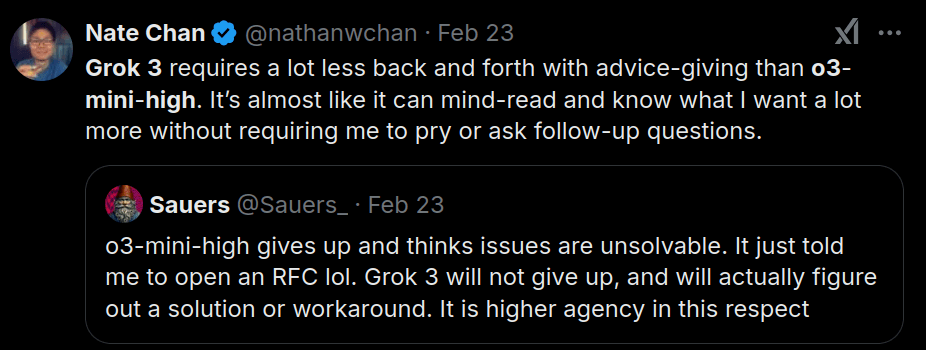
Grok 3 and o3-mini-high are somewhat similar, but if I had to compare them against each other, I would say Grok 3 generates slightly better code than the o3-mini-high model.
Brief on Claude 3.7 Sonnet
This AI Model just got released a few days back and is already the talk of the "tech" community. I’m emphasizing tech because this model is widely regarded as the best AI model for code, at least for now.
You can check out this video by bycloud to get a brief overview on this model's power.
Claude 3.7 Sonnet supports up to 128K output tokens (beta) which is over 15x longer than before. This is especially handy when doing longer and high quality code generation.
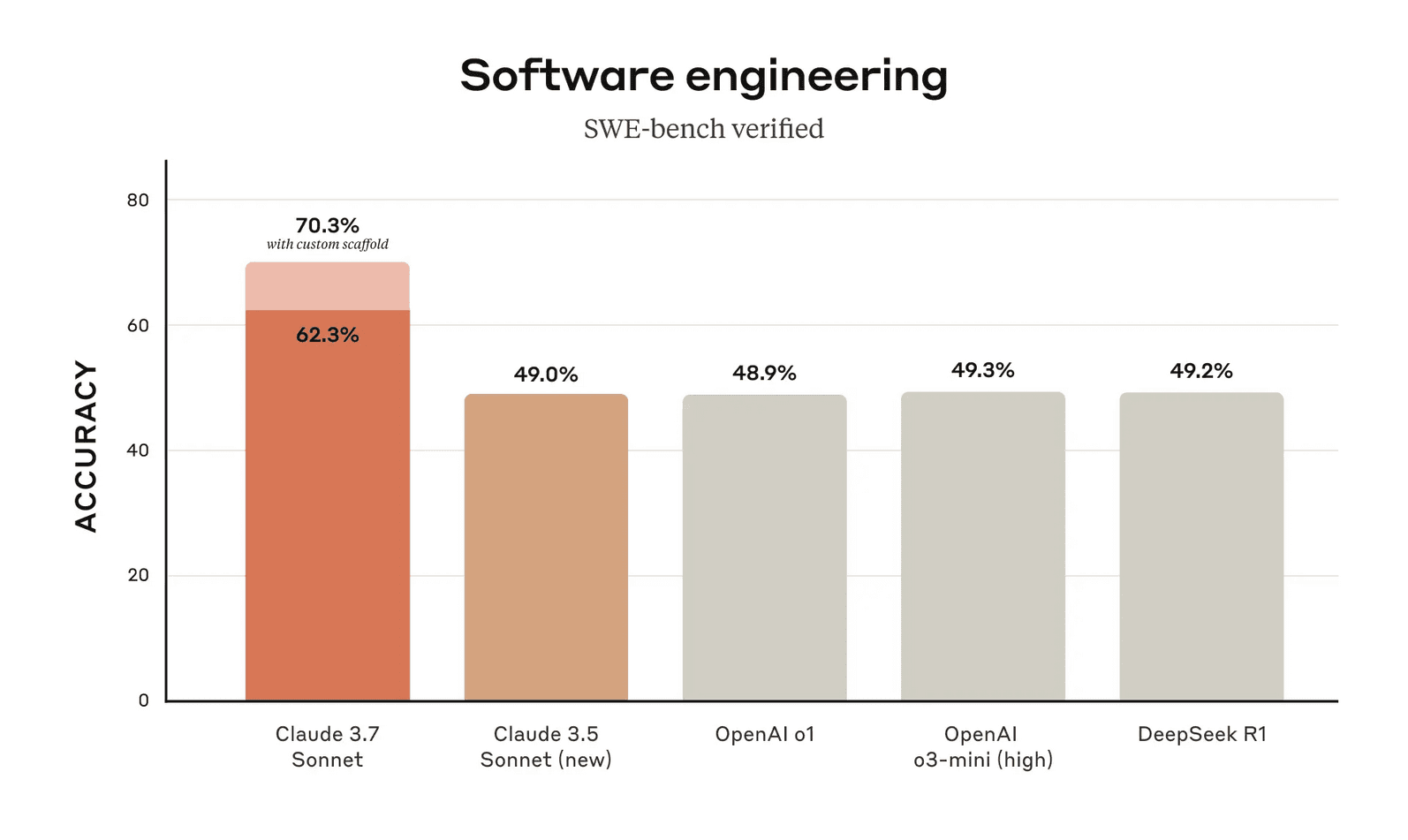
It's eating all the other AI models on the SWE Benchmark with an average accuracy of 62.3%. Its accuracy can even exceed 70%, the highest of any AI model to date. This represents a 13–20% accuracy gap compared to top OpenAI models, the previous Anthropic model Claude 3.5, and open-source models like DeepSeek R1.
Despite this power, Claude 3.7 has 18% reduction in total costs compared to its earlier models. It maintains consistent token-based pricing at $3 per million input tokens and $15 per million output tokens.
Not just that, Anthropic released Claude Code along with it, an agentic AI CLI that understands your codebase, helps fix issues, answers questions, and helps you get idea of your project history with its Git integration.
Check out this video to get a brief understanding of it:
Comparing These Models on Their Coding Abilities
💁♂️ Personally, though, I have really high hopes for the Claude 3.7 Sonnet. Let's see if we can spot any major differences in code between Sonnet and the other two models.
Let's start with something interesting:
1. Build simple Minecraft using Pygame
The task is simple, all the three LLMs are asked to build a simple minecraft game using Pygame.
Prompt: Build me a very simple minecraft game using Pygame in Python.
- Response from Claude 3.7 Sonnet
Here's the code it generated:
import random
import sys

import pygame

# Initialize Pygame
pygame.init()

# Game settings
SCREEN_WIDTH = 800
SCREEN_HEIGHT = 600
BLOCK_SIZE = 40
GRAVITY = 0.5
JUMP_STRENGTH = 10
PLAYER_SPEED = 5

# Colors
SKY_COLOR = (135, 206, 235)
PLAYER_COLOR = (255, 0, 0)
GRASS_COLOR = (34, 139, 34)
DIRT_COLOR = (139, 69, 19)
STONE_COLOR = (105, 105, 105)
COAL_COLOR = (47, 47, 47)
INVENTORY_BG = (64, 64, 64, 128)

# Create screen
screen = pygame.display.set_mode((SCREEN_WIDTH, SCREEN_HEIGHT))
pygame.display.set_caption("Simple Minecraft")
clock = pygame.time.Clock()

# Block types
EMPTY = 0
GRASS = 1
DIRT = 2
STONE = 3
COAL = 4

# Block colors
block_colors = {
    GRASS: GRASS_COLOR,
    DIRT: DIRT_COLOR,
    STONE: STONE_COLOR,
    COAL: COAL_COLOR,
}

# Define player
class Player:
    def __init__(self, x, y):
        self.rect = pygame.Rect(x, y, BLOCK_SIZE - 10, int(BLOCK_SIZE * 1.5))
        self.velocity_y = 0
        self.on_ground = False
        self.selected_block = GRASS

    def move(self, dx, dy, blocks):
        # Move horizontally
        self.rect.x += dx
        self.check_collision(dx, 0, blocks)

        # Apply gravity
        self.velocity_y += GRAVITY
        self.rect.y += int(self.velocity_y)
        self.on_ground = False
        self.check_collision(0, self.velocity_y, blocks)

        # Keep player on screen
        if self.rect.left < 0:
            self.rect.left = 0
        if self.rect.right > SCREEN_WIDTH:
            self.rect.right = SCREEN_WIDTH

    def check_collision(self, dx, dy, blocks):
        for y, row in enumerate(blocks):
            for x, block in enumerate(row):
                if block != EMPTY:
                    block_rect = pygame.Rect(
                        x * BLOCK_SIZE, y * BLOCK_SIZE, BLOCK_SIZE, BLOCK_SIZE
                    )
                    if self.rect.colliderect(block_rect):
                        if dx > 0:  # Moving right
                            self.rect.right = block_rect.left
                        if dx < 0:  # Moving left
                            self.rect.left = block_rect.right
                        if dy > 0:  # Moving down
                            self.rect.bottom = block_rect.top
                            self.on_ground = True
                            self.velocity_y = 0
                        if dy < 0:  # Moving up
                            self.rect.top = block_rect.bottom
                            self.velocity_y = 0

    def jump(self):
        if self.on_ground:
            self.velocity_y = -JUMP_STRENGTH

    def draw(self, surface):
        pygame.draw.rect(surface, PLAYER_COLOR, self.rect)

# Create world
def create_world(width, height):
    world = [[EMPTY for _ in range(width)] for _ in range(height)]

    # Generate terrain
    ground_height = height - 5

    for x in range(width):
        height_variation = random.randint(-1, 1)
        ground_height += height_variation

        # Keep within bounds
        if ground_height < height - 10:
            ground_height = height - 10
        if ground_height > height - 3:
            ground_height = height - 3

        # Add grass at the top
        world[ground_height][x] = GRASS

        # Add dirt below grass
        for y in range(ground_height + 1, ground_height + 4):
            if y < height:
                world[y][x] = DIRT

        # Add stone below dirt
        for y in range(ground_height + 4, height):
            if y < height:
                if random.random() < 0.1:  # 10% chance for coal
                    world[y][x] = COAL
                else:
                    world[y][x] = STONE

    return world

# Initialize game
world_width = SCREEN_WIDTH // BLOCK_SIZE
world_height = SCREEN_HEIGHT // BLOCK_SIZE
world = create_world(world_width, world_height)
player = Player(SCREEN_WIDTH // 2, 0)

# Game loop
running = True
while running:
    for event in pygame.event.get():
        if event.type == pygame.QUIT:
            running = False

        # Jump on space
        if event.type == pygame.KEYDOWN:
            if event.key == pygame.K_SPACE:
                player.jump()

            # Switch selected block
            if event.key == pygame.K_1:
                player.selected_block = GRASS
            elif event.key == pygame.K_2:
                player.selected_block = DIRT
            elif event.key == pygame.K_3:
                player.selected_block = STONE
            elif event.key == pygame.K_4:
                player.selected_block = COAL

        # Place or break blocks with mouse
        if event.type == pygame.MOUSEBUTTONDOWN:
            mouse_x, mouse_y = pygame.mouse.get_pos()
            block_x = mouse_x // BLOCK_SIZE
            block_y = mouse_y // BLOCK_SIZE

            # Make sure it's within world bounds
            if 0 <= block_x < world_width and 0 <= block_y < world_height:
                # Left click to place block
                if event.button == 1:
                    # Don't place if player is there
                    block_rect = pygame.Rect(
                        block_x * BLOCK_SIZE,
                        block_y * BLOCK_SIZE,
                        BLOCK_SIZE,
                        BLOCK_SIZE,
                    )
                    if not player.rect.colliderect(block_rect):
                        world[block_y][block_x] = player.selected_block

                # Right click to break block
                elif event.button == 3:
                    world[block_y][block_x] = EMPTY

    # Handle movement
    keys = pygame.key.get_pressed()
    dx = 0
    if keys[pygame.K_a] or keys[pygame.K_LEFT]:
        dx = -PLAYER_SPEED
    if keys[pygame.K_d] or keys[pygame.K_RIGHT]:
        dx = PLAYER_SPEED

    player.move(dx, 0, world)

    # Draw everything
    screen.fill(SKY_COLOR)

    # Draw blocks
    for y, row in enumerate(world):
        for x, block in enumerate(row):
            if block != EMPTY:
                pygame.draw.rect(
                    screen,
                    block_colors[block],
                    (x * BLOCK_SIZE, y * BLOCK_SIZE, BLOCK_SIZE, BLOCK_SIZE),
                )

    # Draw player
    player.draw(screen)

    # Draw inventory
    pygame.draw.rect(screen, INVENTORY_BG, (10, 10, 200, 50))
    for i, block_type in enumerate([GRASS, DIRT, STONE, COAL]):
        block_rect = pygame.Rect(20 + i * 50, 15, 40, 40)
        pygame.draw.rect(screen, block_colors[block_type], block_rect)

        # Highlight selected block
        if block_type == player.selected_block:
            pygame.draw.rect(screen, (255, 255, 255), block_rect, 2)

        # Draw number
        font = pygame.font.SysFont(None, 24)
        text = font.render(str(i + 1), True, (255, 255, 255))
        screen.blit(text, (block_rect.x + 5, block_rect.y + 5))

    # Update display
    pygame.display.flip()
    clock.tick(60)

pygame.quit()
sys.exit()
Here's the output of the program:

- Response from Grok 3
Here's the code it generated:
import pygame

# Initialize Pygame
pygame.init()

# Screen settings
WIDTH = 800
HEIGHT = 600
BLOCK_SIZE = 40
screen = pygame.display.set_mode((WIDTH, HEIGHT))
pygame.display.set_caption("Simple Minecraft 2D")

# Colors
WHITE = (255, 255, 255)
BLACK = (0, 0, 0)
BROWN = (139, 69, 19)
GREEN = (0, 255, 0)
BLUE = (0, 0, 255)

# Player class
class Player:
    def __init__(self, x, y):
        self.x = x
        self.y = y
        self.width = BLOCK_SIZE
        self.height = BLOCK_SIZE
        self.speed = 5

    def draw(self):
        pygame.draw.rect(screen, BLUE, (self.x, self.y, self.width, self.height))

# Block class
class Block:
    def __init__(self, x, y, block_type):
        self.x = x
        self.y = y
        self.width = BLOCK_SIZE
        self.height = BLOCK_SIZE
        self.type = block_type

    def draw(self):
        if self.type == "dirt":
            pygame.draw.rect(screen, BROWN, (self.x, self.y, self.width, self.height))
        elif self.type == "grass":
            pygame.draw.rect(screen, GREEN, (self.x, self.y, self.width, self.height))

# Create game objects
player = Player(WIDTH // 2, HEIGHT // 2)
blocks = []

# Generate initial terrain
for x in range(0, WIDTH, BLOCK_SIZE):
    for y in range(HEIGHT // 2, HEIGHT, BLOCK_SIZE):
        if y == HEIGHT // 2:
            blocks.append(Block(x, y, "grass"))
        else:
            blocks.append(Block(x, y, "dirt"))

# Game loop
clock = pygame.time.Clock()
running = True
inventory = []

while running:
    for event in pygame.event.get():
        if event.type == pygame.QUIT:
            running = False
        elif event.type == pygame.MOUSEBUTTONDOWN:
            mouse_x, mouse_y = pygame.mouse.get_pos()
            # Left click to break block
            if event.button == 1:
                for block in blocks[:]:
                    if (
                        block.x <= mouse_x < block.x + BLOCK_SIZE
                        and block.y <= mouse_y < block.y + BLOCK_SIZE
                    ):
                        inventory.append(block.type)
                        blocks.remove(block)
                        break
            # Right click to place block
            elif event.button == 3 and inventory:
                grid_x = (mouse_x // BLOCK_SIZE) * BLOCK_SIZE
                grid_y = (mouse_y // BLOCK_SIZE) * BLOCK_SIZE
                # Check if space is empty
                occupied = False
                for block in blocks:
                    if block.x == grid_x and block.y == grid_y:
                        occupied = True
                        break
                if not occupied and grid_y >= HEIGHT // 2:
                    blocks.append(Block(grid_x, grid_y, inventory.pop()))

    # Player movement
    keys = pygame.key.get_pressed()
    if keys[pygame.K_LEFT] and player.x > 0:
        player.x -= player.speed
    if keys[pygame.K_RIGHT] and player.x < WIDTH - player.width:
        player.x += player.speed
    if keys[pygame.K_UP] and player.y > 0:
        player.y -= player.speed
    if keys[pygame.K_DOWN] and player.y < HEIGHT - player.height:
        player.y += player.speed

    # Draw everything
    screen.fill(WHITE)
    for block in blocks:
        block.draw()
    player.draw()

    # Display inventory
    font = pygame.font.Font(None, 36)
    text = font.render(f"Inventory: {len(inventory)} blocks", True, BLACK)
    screen.blit(text, (10, 10))

    pygame.display.flip()
    clock.tick(60)

pygame.quit()
Here's the output of the program:

This program we got is pretty disappointing and definitely not what I expected. Nothing works as it should, except player movement. It looks way less like Minecraft and more like a snake game. 😮💨
- Response from OpenAI o3-mini-high
Here's the code it generated:
import pygame

# Initialize Pygame
pygame.init()

# Screen settings
WIDTH = 800
HEIGHT = 600
BLOCK_SIZE = 40
screen = pygame.display.set_mode((WIDTH, HEIGHT))
pygame.display.set_caption("Simple Minecraft 2D")

# Colors
WHITE = (255, 255, 255)
BLACK = (0, 0, 0)
BROWN = (139, 69, 19)
GREEN = (0, 255, 0)
BLUE = (0, 0, 255)

# Player class
class Player:
    def __init__(self, x, y):
        self.x = x
        self.y = y
        self.width = BLOCK_SIZE
        self.height = BLOCK_SIZE
        self.speed = 5

    def draw(self):
        pygame.draw.rect(screen, BLUE, (self.x, self.y, self.width, self.height))

# Block class
class Block:
    def __init__(self, x, y, block_type):
        self.x = x
        self.y = y
        self.width = BLOCK_SIZE
        self.height = BLOCK_SIZE
        self.type = block_type

    def draw(self):
        if self.type == "dirt":
            pygame.draw.rect(screen, BROWN, (self.x, self.y, self.width, self.height))
        elif self.type == "grass":
            pygame.draw.rect(screen, GREEN, (self.x, self.y, self.width, self.height))

# Create game objects
player = Player(WIDTH // 2, HEIGHT // 2)
blocks = []

# Generate initial terrain
for x in range(0, WIDTH, BLOCK_SIZE):
    for y in range(HEIGHT // 2, HEIGHT, BLOCK_SIZE):
        if y == HEIGHT // 2:
            blocks.append(Block(x, y, "grass"))
        else:
            blocks.append(Block(x, y, "dirt"))

# Game loop
clock = pygame.time.Clock()
running = True
inventory = []

while running:
    for event in pygame.event.get():
        if event.type == pygame.QUIT:
            running = False
        elif event.type == pygame.MOUSEBUTTONDOWN:
            mouse_x, mouse_y = pygame.mouse.get_pos()
            # Left click to break block
            if event.button == 1:
                for block in blocks[:]:
                    if (
                        block.x <= mouse_x < block.x + BLOCK_SIZE
                        and block.y <= mouse_y < block.y + BLOCK_SIZE
                    ):
                        inventory.append(block.type)
                        blocks.remove(block)
                        break
            # Right click to place block
            elif event.button == 3 and inventory:
                grid_x = (mouse_x // BLOCK_SIZE) * BLOCK_SIZE
                grid_y = (mouse_y // BLOCK_SIZE) * BLOCK_SIZE
                # Check if space is empty
                occupied = False
                for block in blocks:
                    if block.x == grid_x and block.y == grid_y:
                        occupied = True
                        break
                if not occupied and grid_y >= HEIGHT // 2:
                    blocks.append(Block(grid_x, grid_y, inventory.pop()))

    # Player movement
    keys = pygame.key.get_pressed()
    if keys[pygame.K_LEFT] and player.x > 0:
        player.x -= player.speed
    if keys[pygame.K_RIGHT] and player.x < WIDTH - player.width:
        player.x += player.speed
    if keys[pygame.K_UP] and player.y > 0:
        player.y -= player.speed
    if keys[pygame.K_DOWN] and player.y < HEIGHT - player.height:
        player.y += player.speed

    # Draw everything
    screen.fill(WHITE)
    for block in blocks:
        block.draw()
    player.draw()

    # Display inventory
    font = pygame.font.Font(None, 36)
    text = font.render(f"Inventory: {len(inventory)} blocks", True, BLACK)
    screen.blit(text, (10, 10))

    pygame.display.flip()
    clock.tick(60)

pygame.quit()
Here's the output of the program:
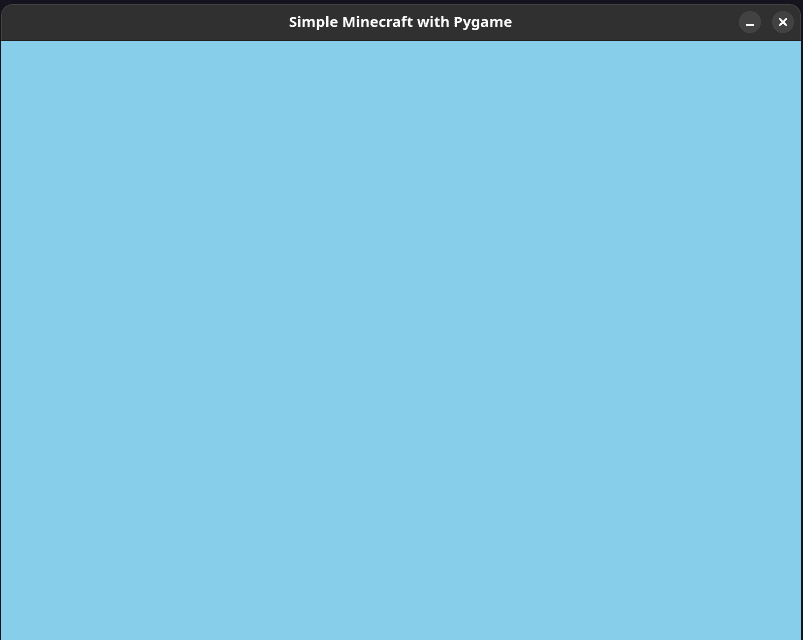
The output by the o3-mini-high model is pretty disappointing, all that we got is a blank screen with added background color. 🤦♂️
Final Verdict: It's pretty fair to say Claude 3.7 wins by a huge margin. ✅ Everything works just as expected. The overall game it built includes almost all the features I thought for.
2. Multiple Balls in a Spinning Hexagon
Let's do a quick test of all these models with a pretty standard question used to judge different LLMs.
This is a modified version of the question where only one ball is spun up inside a spinning hexagon.
Prompt: Write me a Python script for 10 balls inside a fast spinning hexagon.
- Response from Claude 3.7 Sonnet
Here's the code it generated:
import math
import random
import sys

import pygame

# Initialize pygame
pygame.init()

# Constants
WIDTH, HEIGHT = 800, 600
FPS = 60
WHITE = (255, 255, 255)
BLACK = (0, 0, 0)
GRAY = (100, 100, 100)
BALL_COLORS = [
    (255, 0, 0),  # Red
    (0, 255, 0),  # Green
    (0, 0, 255),  # Blue
    (255, 255, 0),  # Yellow
    (255, 0, 255),  # Magenta
    (0, 255, 255),  # Cyan
    (255, 165, 0),  # Orange
    (128, 0, 128),  # Purple
    (255, 192, 203),  # Pink
    (0, 128, 0),  # Dark Green
]

# Screen setup
screen = pygame.display.set_mode((WIDTH, HEIGHT))
pygame.display.set_caption("Multiple Balls in a Fast-Spinning Hexagon")
clock = pygame.time.Clock()

# Hexagon properties
hex_radius = 180
hex_center = (WIDTH // 2, HEIGHT // 2)
hex_rotation = 0
hex_rotation_speed = 2.0  # Increased speed (degrees per frame)

# Ball properties
num_balls = 10
ball_radius = 15
balls = []

# Create balls with random positions and velocities
for i in range(num_balls):
    # Random position inside the hexagon (with some margin from the edges)
    angle = random.uniform(0, 2 * math.pi)
    distance = random.uniform(0, hex_radius - ball_radius * 2)
    x = hex_center[0] + distance * math.cos(angle)
    y = hex_center[1] + distance * math.sin(angle)

    # Random velocity
    velocity_x = random.uniform(-3, 3)
    velocity_y = random.uniform(-3, 3)

    balls.append(
        {
            "pos": [x, y],
            "velocity": [velocity_x, velocity_y],
            "color": BALL_COLORS[i],
            "radius": ball_radius,
        }
    )

# Function to calculate hexagon vertices
def get_hexagon_vertices(center, radius, rotation):
    vertices = []
    for i in range(6):
        angle_deg = rotation + 60 * i
        angle_rad = math.radians(angle_deg)
        x = center[0] + radius * math.cos(angle_rad)
        y = center[1] + radius * math.sin(angle_rad)
        vertices.append((x, y))
    return vertices

# Function to check collision with a line segment
def check_line_collision(ball_pos, ball_radius, line_start, line_end):
    x1, y1 = line_start
    x2, y2 = line_end
    x0, y0 = ball_pos

    # Vector from line start to end
    dx, dy = x2 - x1, y2 - y1

    # Vector from line start to ball
    dx0, dy0 = x0 - x1, y0 - y1

    # Calculate projection length
    t = max(0, min(1, (dx0 * dx + dy0 * dy) / (dx * dx + dy * dy)))

    # Calculate closest point on the line
    closest_x = x1 + t * dx
    closest_y = y1 + t * dy

    # Distance from ball to closest point
    distance = math.sqrt((x0 - closest_x) ** 2 + (y0 - closest_y) ** 2)

    # Return collision info
    if distance <= ball_radius:
        # Normal vector for reflection
        if distance > 0:  # Avoid division by zero
            nx = (x0 - closest_x) / distance
            ny = (y0 - closest_y) / distance
        else:
            nx, ny = 0, -1  # Default normal if distance is zero

        return True, (nx, ny)
    return False, None

# Function to check collision between balls
def check_ball_collision(ball1, ball2):
    x1, y1 = ball1["pos"]
    x2, y2 = ball2["pos"]

    # Distance between balls
    distance = math.sqrt((x2 - x1) ** 2 + (y2 - y1) ** 2)

    # If balls are colliding
    if distance <= (ball1["radius"] + ball2["radius"]):
        # Normal vector
        if distance > 0:
            nx = (x2 - x1) / distance
            ny = (y2 - y1) / distance
        else:
            nx, ny = 0, 1  # Default if balls are at the same position

        return True, (nx, ny)
    return False, None

# Main game loop
gravity = 0.1
ball_speed_limit = 6
running = True

while running:
    for event in pygame.event.get():
        if event.type == pygame.QUIT:
            running = False

    # Update hexagon rotation
    hex_rotation += hex_rotation_speed
    if hex_rotation >= 360:
        hex_rotation -= 360

    # Get hexagon vertices
    hex_vertices = get_hexagon_vertices(hex_center, hex_radius, hex_rotation)

    # Update balls
    for ball in balls:
        # Apply gravity
        ball["velocity"][1] += gravity

        # Update ball position
        ball["pos"][0] += ball["velocity"][0]
        ball["pos"][1] += ball["velocity"][1]

        # Check collision with hexagon sides
        for i in range(6):
            start = hex_vertices[i]
            end = hex_vertices[(i + 1) % 6]

            collision, normal = check_line_collision(
                ball["pos"], ball["radius"], start, end
            )
            if collision:
                # Reflect velocity across the normal
                nx, ny = normal
                dot_product = ball["velocity"][0] * nx + ball["velocity"][1] * ny
                ball["velocity"][0] -= 2 * dot_product * nx
                ball["velocity"][1] -= 2 * dot_product * ny

                # Apply some energy loss
                ball["velocity"][0] *= 0.9
                ball["velocity"][1] *= 0.9

                # Move ball away from the wall to avoid getting stuck
                ball["pos"][0] += nx * 2
                ball["pos"][1] += ny * 2

        # Limit ball speed
        speed = math.sqrt(ball["velocity"][0] ** 2 + ball["velocity"][1] ** 2)
        if speed > ball_speed_limit:
            ball["velocity"][0] = (ball["velocity"][0] / speed) * ball_speed_limit
            ball["velocity"][1] = (ball["velocity"][1] / speed) * ball_speed_limit

    # Check collisions between balls
    for i in range(num_balls):
        for j in range(i + 1, num_balls):
            collision, normal = check_ball_collision(balls[i], balls[j])
            if collision:
                # Calculate relative velocity
                nx, ny = normal
                vx1, vy1 = balls[i]["velocity"]
                vx2, vy2 = balls[j]["velocity"]

                # Relative velocity along the normal
                vrn = (vx1 - vx2) * nx + (vy1 - vy2) * ny

                # If balls are moving away from each other, skip
                if vrn < 0:
                    continue

                # Mass (assume equal mass)
                m1 = 1.0
                m2 = 1.0

                # Elastic collision response
                impulse = 2.0 * vrn / (m1 + m2)

                # Update velocities
                balls[i]["velocity"][0] -= impulse * m2 * nx
                balls[i]["velocity"][1] -= impulse * m2 * ny
                balls[j]["velocity"][0] += impulse * m1 * nx
                balls[j]["velocity"][1] += impulse * m1 * ny

                # Move balls apart to avoid sticking
                overlap = (
                    balls[i]["radius"]
                    + balls[j]["radius"]
                    - math.sqrt(
                        (balls[i]["pos"][0] - balls[j]["pos"][0]) ** 2
                        + (balls[i]["pos"][1] - balls[j]["pos"][1]) ** 2
                    )
                )

                if overlap > 0:
                    # Move proportional to their velocities
                    balls[i]["pos"][0] -= nx * overlap * 0.5
                    balls[i]["pos"][1] -= ny * overlap * 0.5
                    balls[j]["pos"][0] += nx * overlap * 0.5
                    balls[j]["pos"][1] += ny * overlap * 0.5

    # Draw everything
    screen.fill(BLACK)

    # Draw hexagon
    pygame.draw.polygon(screen, GRAY, hex_vertices, 3)

    # Draw balls
    for ball in balls:
        pygame.draw.circle(
            screen,
            ball["color"],
            (int(ball["pos"][0]), int(ball["pos"][1])),
            ball["radius"],
        )

    pygame.display.flip()
    clock.tick(FPS)

pygame.quit()
sys.exit()
The code has just a few minor issues, like how we are extracting values from the normal returned by the check_ball_collision method without checking if the value is None.
Other than that, everything looks quite good.
Here's the output of the program:

- Response from Grok 3
Here's the code it generated:
import math
import random

import pygame

# Initialize Pygame
pygame.init()

# Set up the display
WIDTH = 800
HEIGHT = 600
screen = pygame.display.set_mode((WIDTH, HEIGHT))
pygame.display.set_caption("Balls in Spinning Hexagon")

# Colors
WHITE = (255, 255, 255)
RED = (255, 0, 0)
BLUE = (0, 0, 255)

# Hexagon properties
center_x = WIDTH // 2
center_y = HEIGHT // 2
hex_size = 200
hex_angle = 0
hex_speed = 0.05  # radians per frame

# Ball properties
class Ball:
    def __init__(self):
        self.radius = 10
        self.x = center_x
        self.y = center_y
        self.dx = random.uniform(-3, 3)
        self.dy = random.uniform(-3, 3)
        self.color = (
            random.randint(0, 255),
            random.randint(0, 255),
            random.randint(0, 255),
        )

# Create balls
balls = [Ball() for _ in range(10)]

# Get hexagon vertices
def get_hexagon_vertices(x, y, size, angle):
    vertices = []
    for i in range(6):
        vertex_angle = angle + (math.pi / 3) * i
        vx = x + size * math.cos(vertex_angle)
        vy = y + size * math.sin(vertex_angle)
        vertices.append((vx, vy))
    return vertices

# Check collision with hexagon walls
def check_collision(ball, vertices):
    for i in range(6):
        x1, y1 = vertices[i]
        x2, y2 = vertices[(i + 1) % 6]

        # Line equation: ax + by + c = 0
        a = y2 - y1
        b = x1 - x2
        c = -(a * x1 + b * y1)

        # Distance from point to line
        distance = abs(a * ball.x + b * ball.y + c) / math.sqrt(a * a + b * b)

        if distance <= ball.radius:
            # Normal vector
            nx = b
            ny = -a
            norm_length = math.sqrt(nx * nx + ny * ny)
            nx /= norm_length
            ny /= norm_length

            # Reflect velocity
            dot = ball.dx * nx + ball.dy * ny
            ball.dx = ball.dx - 2 * dot * nx
            ball.dy = ball.dy - 2 * dot * ny

            # Push ball away from wall
            penetration = ball.radius - distance
            ball.x += nx * penetration
            ball.y += ny * penetration

# Main game loop
clock = pygame.time.Clock()
running = True

while running:
    for event in pygame.event.get():
        if event.type == pygame.QUIT:
            running = False

    # Clear screen
    screen.fill((0, 0, 0))

    # Update hexagon rotation
    hex_angle += hex_speed
    vertices = get_hexagon_vertices(center_x, center_y, hex_size, hex_angle)

    # Update balls
    for ball in balls:
        # Move ball
        ball.x += ball.dx
        ball.y += ball.dy

        # Check collision with hexagon
        check_collision(ball, vertices)

        # Draw ball
        pygame.draw.circle(screen, ball.color, (int(ball.x), int(ball.y)), ball.radius)

    # Draw hexagon
    pygame.draw.polygon(screen, WHITE, vertices, 2)

    # Update display
    pygame.display.flip()
    clock.tick(60)

pygame.quit()
Here's the output of the program:

There's an issue, the balls are not supposed to be outside of the hexagon.
When I asked it the standard question of one ball inside the spinning hexagon, it answered easily, but it couldn't handle when I tweaked it just a bit.
Fair to say, this model could not handle this question well.
- Response from OpenAI o3-mini-high
Here's the code it generated:
#!/usr/bin/env python3

import math
import random
import pygame

def get_hexagon_vertices(center, radius, angle_offset):
    """
    Returns a list of 6 pygame.Vector2 vertices for a regular hexagon.

    center      -- pygame.Vector2 at the center.
    radius      -- Distance from center to a vertex.
    angle_offset-- Overall rotation in radians.
    """
    vertices = []
    for i in range(6):
        # Each vertex is 60 degrees (pi/3 radians) apart.
        angle = math.radians(60 * i) + angle_offset
        vertex = center + pygame.Vector2(math.cos(angle) * radius,
                                         math.sin(angle) * radius)
        vertices.append(vertex)
    return vertices

def point_in_poly(x, y, poly):
    """
    Determines if point (x, y) is inside the polygon.
    poly is a list of (x, y) tuples.
    (Uses the ray-casting algorithm.)
    """
    inside = False
    n = len(poly)
    p1x, p1y = poly[0]
    for i in range(n+1):
        p2x, p2y = poly[i % n]
        if (y > min(p1y, p2y)) and (y <= max(p1y, p2y)) and (x <= max(p1x, p2x)):
            if p1y != p2y:
                xinters = (y - p1y) * (p2x - p1x) / (p2y - p1y) + p1x
            else:
                xinters = p1x
            if p1x == p2x or x <= xinters:
                inside = not inside
        p1x, p1y = p2x, p2y
    return inside

def main():
    pygame.init()

    # Window size and title
    width, height = 800, 600
    screen = pygame.display.set_mode((width, height))
    pygame.display.set_caption("10 Balls Inside a Fast Spinning Hexagon")
    clock = pygame.time.Clock()

    hex_center = pygame.Vector2(width/2, height/2)
    hex_radius = 200           # Distance from center to vertex.
    rotation_angle = 0         # Current rotation angle in radians.
    rotation_speed = 5         # Radians per second (fast spinning).

    ball_radius = 10
    n_balls = 10
    balls = []   # Each ball is a dictionary with keys: pos, vel, color.

    # Use the hexagon's initial (unrotated) vertices for placing balls.
    initial_vertices = get_hexagon_vertices(hex_center, hex_radius, rotation_angle)
    # Convert vertices to a list of (x,y) tuples for point_in_poly testing.
    initial_poly = [(v.x, v.y) for v in initial_vertices]

    # Create n_balls with random positions INSIDE the hexagon and random velocities.
    while len(balls) < n_balls:
        test_x = random.uniform(hex_center.x - hex_radius, hex_center.x + hex_radius)
        test_y = random.uniform(hex_center.y - hex_radius, hex_center.y + hex_radius)
        # Only accept if inside the polygon:
        if point_in_poly(test_x, test_y, initial_poly):
            ball = {
                'pos': pygame.Vector2(test_x, test_y),
                # Random velocity (pixels per second). Adjust the numbers for speed.
                'vel': pygame.Vector2(random.uniform(-200, 200),
                                      random.uniform(-200, 200)),
                'color': (random.randint(50,255), random.randint(50,255), random.randint(50,255))
            }
            balls.append(ball)

    running = True
    while running:
        dt = clock.tick(60) / 1000.0   # Delta-time in seconds.

        for event in pygame.event.get():
            if event.type == pygame.QUIT:
                running = False
            # Optionally press ESC to quit.
            elif event.type == pygame.KEYDOWN and event.key == pygame.K_ESCAPE:
                running = False

        # Increase the rotation angle.
        rotation_angle += rotation_speed * dt
        # (Keep angle bounded to 2pi if you like; not strictly necessary.)
        rotation_angle %= (2 * math.pi)

        # Compute the current hexagon vertices.
        hex_vertices = get_hexagon_vertices(hex_center, hex_radius, rotation_angle)

        # For collision computations we need the “inward” normal for each edge.
        # For a given edge from A to B, the inward normal is chosen so that:
        #    n = N/|N|, where N = (-(B.y-A.y), (B.x-A.x)) or its negative,
        # and it must point towards the hexagon center.
        edge_normals = []
        n_edges = len(hex_vertices)
        for i in range(n_edges):
            A = hex_vertices[i]
            B = hex_vertices[(i+1) % n_edges]
            edge = B - A
            # Candidate normal (rotate 90 degrees)
            candidate = pygame.Vector2(-edge.y, edge.x)
            # Check – choose the normal that points toward the hexagon’s center.
            if candidate.dot(hex_center - A) < 0:
                candidate = -candidate
            n = candidate.normalize()
            edge_normals.append((A, n))

        # Update each ball’s position and check for collision with each edge.
        for ball in balls:
            ball['pos'] += ball['vel'] * dt

            # Check collision with every edge of the hexagon.
            for A, n in edge_normals:
                # Compute how far the ball's center is along the inward normal from edge A.
                # (The signed distance.)
                d = (ball['pos'] - A).dot(n)
                if d < ball_radius:
                    # Only reflect if the ball is moving against the wall.
                    if ball['vel'].dot(n) < 0:
                        ball['vel'] = ball['vel'] - 2 * ball['vel'].dot(n) * n
                    # Push the ball out of penetration.
                    ball['pos'] += (ball_radius - d) * n

        screen.fill((0, 0, 0))  # clear with black.

        # Draw the hexagon (outline only).
        # Convert hexagon vertices from Vector2 to tuples.
        hex_points = [(int(v.x), int(v.y)) for v in hex_vertices]
        pygame.draw.polygon(screen, (255, 255, 255), hex_points, 3)

        # Draw balls.
        for ball in balls:
            pos = (int(ball['pos'].x), int(ball['pos'].y))
            pygame.draw.circle(screen, ball['color'], pos, ball_radius)

        pygame.display.flip()

    pygame.quit()

if __name__ == "__main__":
    main()
Here's the output of the program:

Final Verdict: On this question, I was pretty surprised that, except for the Grok 3 model, both Claude 3.7 and o3-mini-high got the answer correct ✅. o3-mini-high seems to have outperformed Grok 3 here.
3. Build a realtime Browser-Based Markdown Editor
Considering how good Claude has been in both the tests of building a game and animation, and again with their solid claims on coding, let's do a quick web app test on all three models.
Prompt: Build a tiny browser-based Markdown editor with syntax highlighting, export-to-PDF functionality, and a minimal UI using Tailwind in Next.js, with all the changes in a single file.
- Response from Claude 3.7 Sonnet
Here's the code it generated:
"use client";

import { useState, useEffect } from "react";
import { marked } from "marked";
import hljs from "highlight.js";
import "highlight.js/styles/github.css";
import { jsPDF } from "jspdf";
import html2canvas from "html2canvas";

// Configure marked with highlight.js for syntax highlighting
marked.setOptions({
  highlight: function (code: string, lang: string) {
    if (lang && hljs.getLanguage(lang)) {
      return hljs.highlight(code, { language: lang }).value;
    }
    return hljs.highlightAuto(code).value;
  },
  breaks: true,
});

export default function MarkdownEditor() {
  const [markdown, setMarkdown] = useState<string>(
    '# Hello, Markdown!\n\nStart typing here...\n\n```javascript\n// Code snippet example\nfunction hello() {\n  console.log("Hello, world!");\n}\n```',
  );
  const [html, setHtml] = useState<string>("");
  const [isDark, setIsDark] = useState<boolean>(false);

  // Convert markdown to HTML when input changes
  useEffect(() => {
    const convertMarkdown = async () => {
      const parsedHtml = await marked.parse(markdown);
      setHtml(parsedHtml);
    };

    convertMarkdown();
  }, [markdown]);

  // Toggle dark mode
  const toggleDarkMode = () => {
    setIsDark(!isDark);
  };

  // Export to PDF
  const exportToPdf = async () => {
    const previewElement = document.getElementById("preview");

    if (!previewElement) return;

    // Set background to white for PDF export
    const originalBackground = previewElement.style.background;
    const originalColor = previewElement.style.color;
    previewElement.style.background = "white";
    previewElement.style.color = "black";
    previewElement.style.padding = "20px";

    try {
      const canvas = await html2canvas(previewElement, {
        scale: 2,
        useCORS: true,
        logging: false,
      });

      const imgData = canvas.toDataURL("image/png");
      const pdf = new jsPDF({
        orientation: "portrait",
        unit: "mm",
        format: "a4",
      });

      const pdfWidth = pdf.internal.pageSize.getWidth();
      const pdfHeight = pdf.internal.pageSize.getHeight();
      const imgWidth = canvas.width;
      const imgHeight = canvas.height;
      const ratio = Math.min(pdfWidth / imgWidth, pdfHeight / imgHeight);
      const imgX = (pdfWidth - imgWidth * ratio) / 2;
      const imgY = 30;

      pdf.addImage(
        imgData,
        "PNG",
        imgX,
        imgY,
        imgWidth * ratio,
        imgHeight * ratio,
      );
      pdf.save("markdown-document.pdf");
    } finally {
      // Reset styling after export
      previewElement.style.background = originalBackground;
      previewElement.style.color = originalColor;
      previewElement.style.padding = "";
    }
  };

  return (
    <div
      className={`min-h-screen ${isDark ? "bg-gray-900 text-white" : "bg-gray-100 text-gray-800"}`}
    >
      {/* Header */}
      <header
        className={`p-4 flex justify-between items-center ${isDark ? "bg-gray-800" : "bg-white border-b"}`}
      >
        <h1 className="text-xl font-bold">Markdown Editor</h1>
        <div className="flex gap-2">
          <button
            onClick={toggleDarkMode}
            className={`px-3 py-1 rounded ${isDark ? "bg-gray-700 hover:bg-gray-600" : "bg-gray-200 hover:bg-gray-300"}`}
          >
            {isDark ? "☀️ Light" : "🌙 Dark"}
          </button>
          <button
            onClick={exportToPdf}
            className="px-3 py-1 rounded bg-blue-500 text-white hover:bg-blue-600"
          >
            Export PDF
          </button>
        </div>
      </header>

      {/* Editor and Preview */}
      <div className="flex flex-col md:flex-row h-[calc(100vh-64px)]">
        {/* Markdown Input */}
        <div className="w-full md:w-1/2 h-1/2 md:h-full p-2">
          <textarea
            className={`w-full h-full p-4 font-mono text-sm resize-none focus:outline-none rounded-md ${
              isDark
                ? "bg-gray-800 text-gray-100"
                : "bg-white border text-gray-800"
            }`}
            value={markdown}
            onChange={(e) => setMarkdown(e.target.value)}
            placeholder="Type markdown here..."
          />
        </div>

        {/* Preview */}
        <div className="w-full md:w-1/2 h-1/2 md:h-full p-2">
          <div
            id="preview"
            className={`w-full h-full p-4 overflow-auto rounded-md prose ${
              isDark ? "bg-gray-800 prose-invert" : "bg-white border"
            } max-w-none`}
            dangerouslySetInnerHTML={{ __html: html }}
          />
        </div>
      </div>
    </div>
  );
}
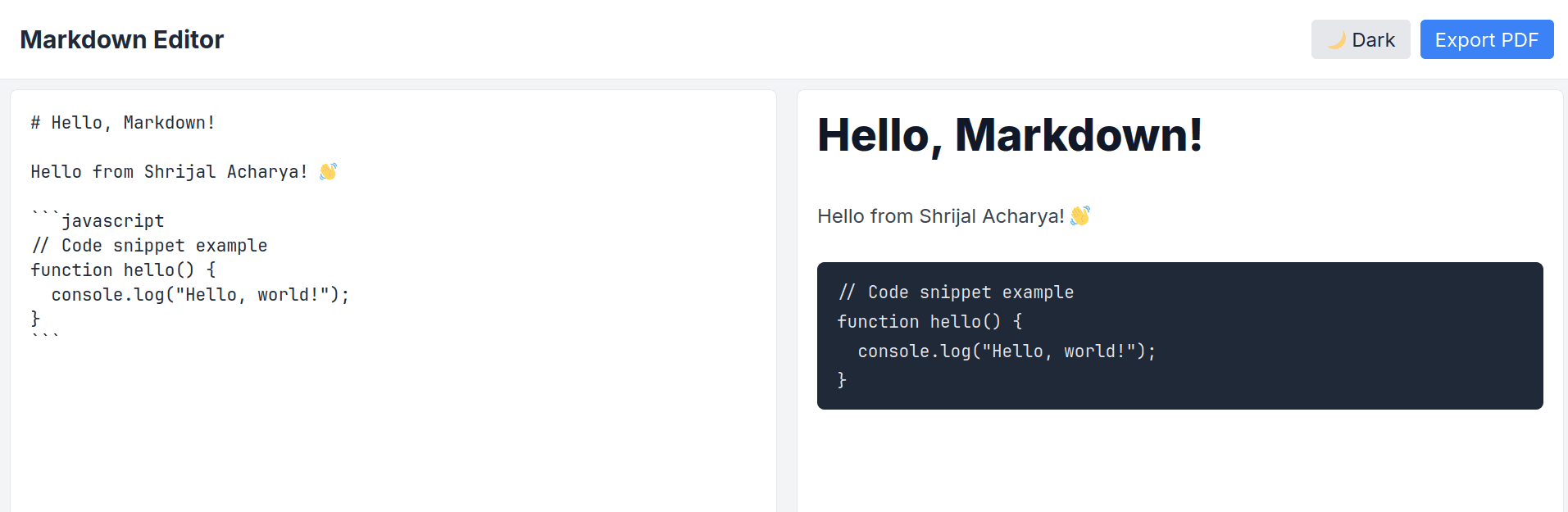
The code is almost all good, except that code highlighting does not work properly. This seems to be an issue because marked recently introduced breaking changes in setting up code highlighting.
The model may not be trained on the most recent data for the module.
Here's the output of the program:
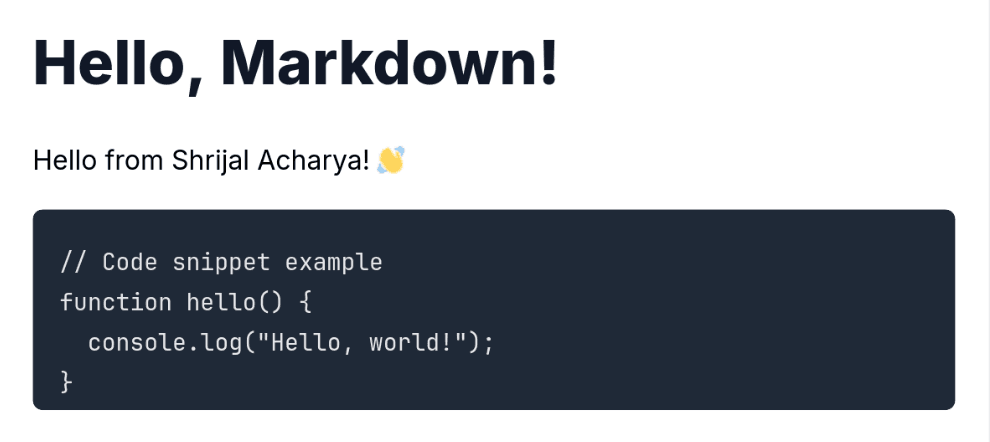
Here's the exported PDF:
- Response from Grok 3
Here's the code it generated:
"use client";

import { useState } from "react";
import ReactMarkdown from "react-markdown";
import { Prism as SyntaxHighlighter } from "react-syntax-highlighter";
import { dracula } from "react-syntax-highlighter/dist/esm/styles/prism";
import { jsPDF } from "jspdf";

export default function MarkdownEditor() {
  const [content, setContent] = useState<string>(`# Welcome to Markdown Editor

Write some **bold** text or *italic* text here.

\`\`\`javascript
// Code example
function hello() {
  console.log("Hello, World!");
}
\`\`\`
`);

  const handleExportPDF = () => {
    const doc = new jsPDF();
    const pageWidth = doc.internal.pageSize.getWidth();
    const margin = 20;
    const maxWidth = pageWidth - 2 * margin;

    // Split content into lines and handle basic formatting
    const lines = doc.splitTextToSize(content, maxWidth);
    let y = margin;

    lines.forEach((line: string) => {
      if (y > 280) {
        doc.addPage();
        y = margin;
      }
      doc.text(line, margin, y);
      y += 7;
    });

    doc.save("markdown-export.pdf");
  };

  return (
    <div className="min-h-screen bg-gray-100 flex flex-col">
      <header className="bg-white shadow-sm p-4 flex justify-between items-center">
        <h1 className="text-xl font-semibold text-gray-800">Markdown Editor</h1>
        <button
          onClick={handleExportPDF}
          className="px-4 py-2 bg-blue-600 text-white rounded hover:bg-blue-700 transition-colors"
        >
          Export to PDF
        </button>
      </header>

      <main className="flex-1 flex p-6 gap-6 max-w-7xl mx-auto w-full">
        {/* Editor */}
        <div className="flex-1">
          <textarea
            value={content}
            onChange={(e) => setContent(e.target.value)}
            className="w-full h-[calc(100vh-120px)] p-4 bg-white rounded-lg shadow-sm border border-gray-200 focus:outline-none focus:ring-2 focus:ring-blue-500 font-mono text-sm resize-none"
            placeholder="Start writing markdown..."
          />
        </div>

        {/* Preview */}
        <div className="flex-1">
          <div className="w-full h-[calc(100vh-120px)] p-4 bg-white rounded-lg shadow-sm border border-gray-200 overflow-auto">
            <ReactMarkdown
              components={{
                code({ node, inline, className, children, ...props }) {
                  const match = /language-(\w+)/.exec(className || "");
                  return !inline && match ? (
                    <SyntaxHighlighter
                      style={dracula}
                      language={match[1]}
                      PreTag="div"
                      {...props}
                    >
                      {String(children).replace(/\n$/, "")}
                    </SyntaxHighlighter>
                  ) : (
                    <code className={className} {...props}>
                      {children}
                    </code>
                  );
                },
              }}
            >
              {content}
            </ReactMarkdown>
          </div>
        </div>
      </main>
    </div>
  );
}
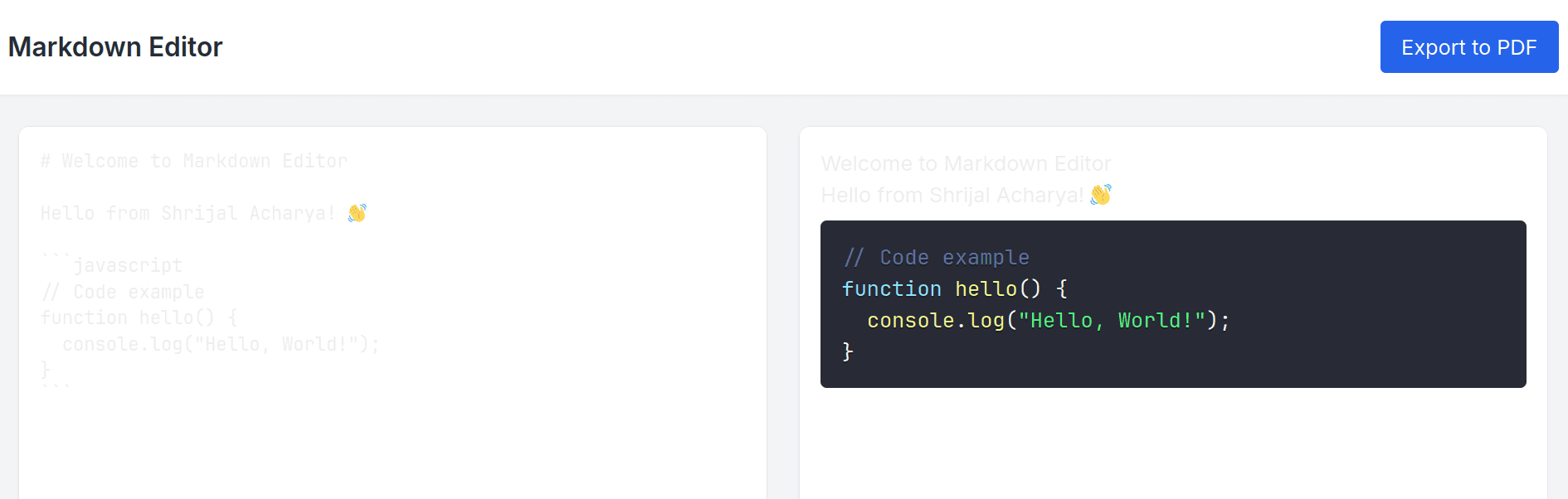
There are a couple of issues we’ve got, the first one being that the headings don’t really work. There are issues with the font contrast, and the exported PDF doesn’t render the Markdown properly.
Here's the output of the program:
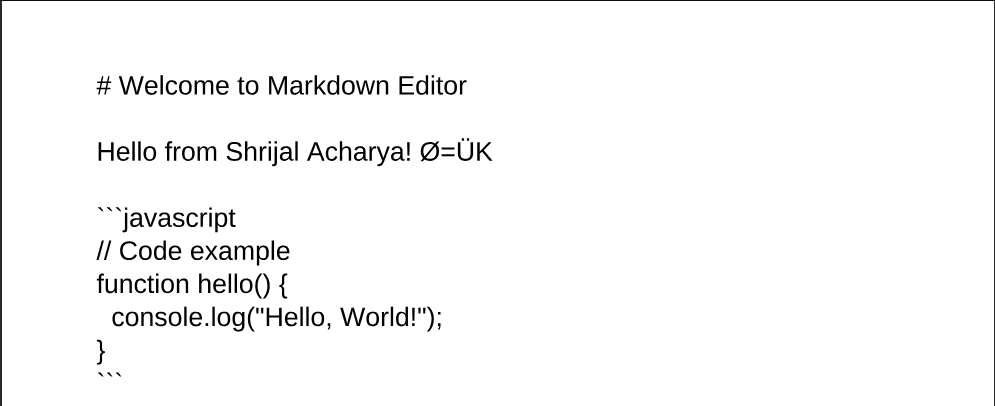
In the exported PDF, we get raw text instead of formatted Markdown, with no emoji support.
- Response from OpenAI o3-mini-high
Here's the code it generated:
"use client";

import { useState, useRef } from "react";
import Head from "next/head";
import ReactMarkdown from "react-markdown";
import rehypeHighlight from "rehype-highlight";
import html2pdf from "html2pdf.js";
import "highlight.js/styles/github-dark.css";

export default function Home() {
  const [markdown, setMarkdown] = useState(`# Welcome to the Markdown Editor

\`\`\`javascript
// Write some JavaScript here:
function greet(name) {
  return \`Hello, \${name}!\`;
}

console.log(greet("World"));
\`\`\`

**Enjoy editing!**
`);
  const previewRef = useRef(null);

  const exportPDF = () => {
    if (previewRef.current) {
      const options = {
        margin: 0.5,
        filename: "markdown_document.pdf",
        image: { type: "jpeg", quality: 0.98 },
        html2canvas: { scale: 2 },
        jsPDF: { unit: "in", format: "letter", orientation: "portrait" },
      };
      html2pdf().set(options).from(previewRef.current).save();
    }
  };

  return (
    <>
      <Head>
        <title>Markdown Editor</title>
        <meta name="viewport" content="width=device-width, initial-scale=1" />
        {/* Tailwind via CDN - remove this if you already have Tailwind configured */}
        <script src="https://cdn.tailwindcss.com"></script>
      </Head>
      <div className="min-h-screen bg-gray-100 p-4">
        <h1 className="text-3xl font-bold text-center mb-4">Markdown Editor</h1>
        <div className="flex flex-col md:flex-row gap-4">
          <textarea
            value={markdown}
            onChange={(e) => setMarkdown(e.target.value)}
            placeholder="Write your markdown here..."
            className="w-full md:w-1/2 h-80 p-4 rounded border border-gray-300 focus:outline-none focus:ring-2 focus:ring-blue-500"
          />
          <div
            ref={previewRef}
            className="w-full md:w-1/2 h-80 p-4 rounded border border-gray-300 bg-white overflow-auto"
          >
            <ReactMarkdown rehypePlugins={[rehypeHighlight]}>
              {markdown}
            </ReactMarkdown>
          </div>
        </div>
        <div className="mt-4 flex justify-center">
          <button
            onClick={exportPDF}
            className="px-4 py-2 bg-blue-500 text-white rounded hover:bg-blue-600 focus:outline-none"
          >
            Export to PDF
          </button>
        </div>
      </div>
    </>
  );
}
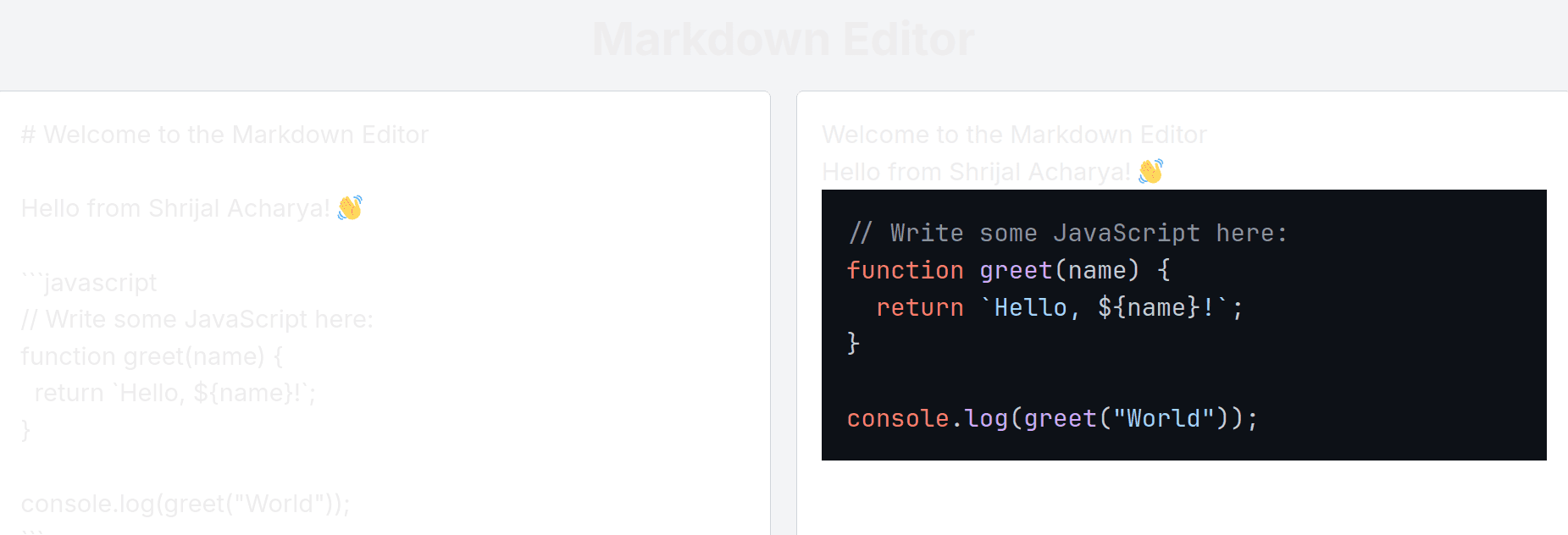
Here's the output of the program:
Here's the exported PDF:
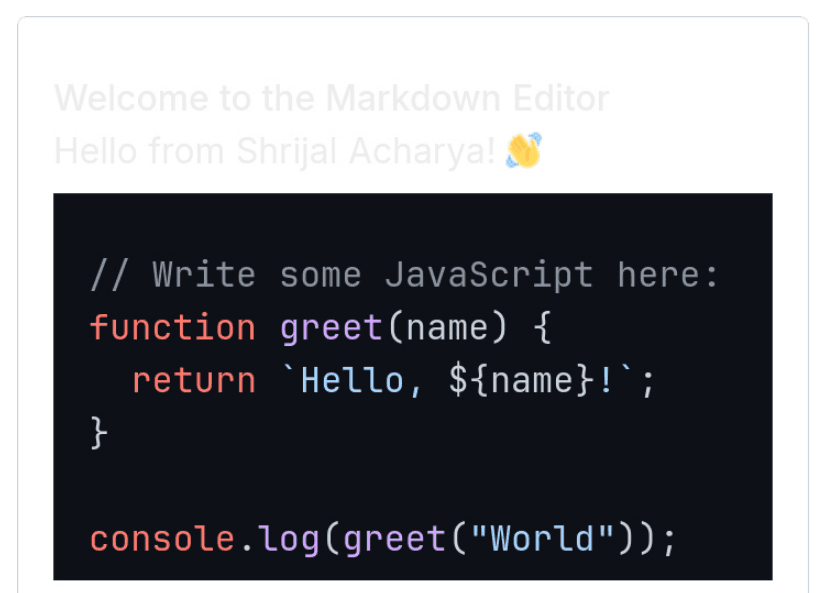
Final Verdict: Here as well, Claude 3.7 is the clear winner compared to the other two models. ✅ Almost everything worked, but the other two models couldn't get it right. There were a couple of issues with text contrast, markdown rendering on the site and in the PDF.
4. Build a Code Diff Viewer
Let's try a simple web application example to see if all of them get it right.
This is a pretty standard question and somewhat easy to implement. I have high hopes that all three of them should get it right (even o3-mini-high 😮💨). So far, I'm somewhat disappointed with it, though.
Prompt: Write a simple web application for a code diff viewer, a tool that takes two text inputs and highlights differences side by side.
- Response from Claude 3.7 Sonnet
Here's the code it generated:
"use client";

import { useState, useEffect } from "react";

export default function CodeDiffViewer() {
  const [leftCode, setLeftCode] = useState("");
  const [rightCode, setRightCode] = useState("");
  const [diffLines, setDiffLines] = useState<{
    left: { text: string; changed: boolean }[];
    right: { text: string; changed: boolean }[];
  }>({
    left: [],
    right: [],
  });

  useEffect(() => {
    computeDiff(leftCode, rightCode);
  }, [leftCode, rightCode]);

  // Simple diff algorithm to find differences between two texts
  const computeDiff = (leftText: string, rightText: string) => {
    const leftLines = leftText.split("\n");
    const rightLines = rightText.split("\n");

    const left: { text: string; changed: boolean }[] = [];
    const right: { text: string; changed: boolean }[] = [];

    const maxLength = Math.max(leftLines.length, rightLines.length);

    for (let i = 0; i < maxLength; i++) {
      const leftLine = i < leftLines.length ? leftLines[i] : "";
      const rightLine = i < rightLines.length ? rightLines[i] : "";

      const isChanged = leftLine !== rightLine;

      left.push({ text: leftLine, changed: isChanged });
      right.push({ text: rightLine, changed: isChanged });
    }

    setDiffLines({ left, right });
  };

  return (
    <div className="min-h-screen bg-gray-100 py-8">
      <div className="max-w-7xl mx-auto px-4 sm:px-6 lg:px-8">
        <div className="text-center">
          <h1 className="text-3xl font-bold text-gray-900 mb-8">
            Code Diff Viewer
          </h1>
        </div>

        <div className="grid grid-cols-1 md:grid-cols-2 gap-4 mb-8">
          <div>
            <label
              htmlFor="leftCode"
              className="block text-sm font-medium text-gray-700 mb-2"
            >
              Original Code
            </label>
            <textarea
              id="leftCode"
              className="w-full text-black h-64 p-3 border border-gray-300 rounded-md shadow-sm focus:ring-indigo-500 focus:border-indigo-500"
              value={leftCode}
              onChange={(e) => setLeftCode(e.target.value)}
              placeholder="Paste your original code here..."
            ></textarea>
          </div>
          <div>
            <label
              htmlFor="rightCode"
              className="block text-sm font-medium text-gray-700 mb-2"
            >
              Modified Code
            </label>
            <textarea
              id="rightCode"
              className="w-full text-black h-64 p-3 border border-gray-300 rounded-md shadow-sm focus:ring-indigo-500 focus:border-indigo-500"
              value={rightCode}
              onChange={(e) => setRightCode(e.target.value)}
              placeholder="Paste your modified code here..."
            ></textarea>
          </div>
        </div>

        <div className="bg-white shadow-md rounded-lg overflow-hidden">
          <div className="p-4 bg-gray-50 border-b border-gray-200">
            <h2 className="text-lg font-medium text-gray-900">Diff Result</h2>
          </div>

          <div className="grid grid-cols-1 md:grid-cols-2 gap-0">
            <div className="border-r border-gray-200">
              <div className="p-1 bg-gray-100 border-b border-gray-200 text-sm font-medium text-gray-700 text-center">
                Original
              </div>
              <pre className="p-4 text-sm text-black overflow-x-auto">
                <code>
                  {diffLines.left.map((line, idx) => (
                    <div
                      key={idx}
                      className={`${line.changed ? "bg-red-100" : ""} py-1 px-2 -mx-2 whitespace-pre`}
                    >
                      {line.text || " "}
                    </div>
                  ))}
                </code>
              </pre>
            </div>
            <div>
              <div className="p-1 bg-gray-100 border-b border-gray-200 text-sm font-medium text-gray-700 text-center">
                Modified
              </div>
              <pre className="p-4 text-sm text-black overflow-x-auto">
                <code>
                  {diffLines.right.map((line, idx) => (
                    <div
                      key={idx}
                      className={`${line.changed ? "bg-green-100" : ""} py-1 px-2 -mx-2 whitespace-pre`}
                    >
                      {line.text || " "}
                    </div>
                  ))}
                </code>
              </pre>
            </div>
          </div>
        </div>

        <div className="mt-8 text-center text-gray-500 text-sm">
          <p>
            Enter code in both text areas to see the differences highlighted.
          </p>
        </div>
      </div>
    </div>
  );
}
Here's the output of the program:
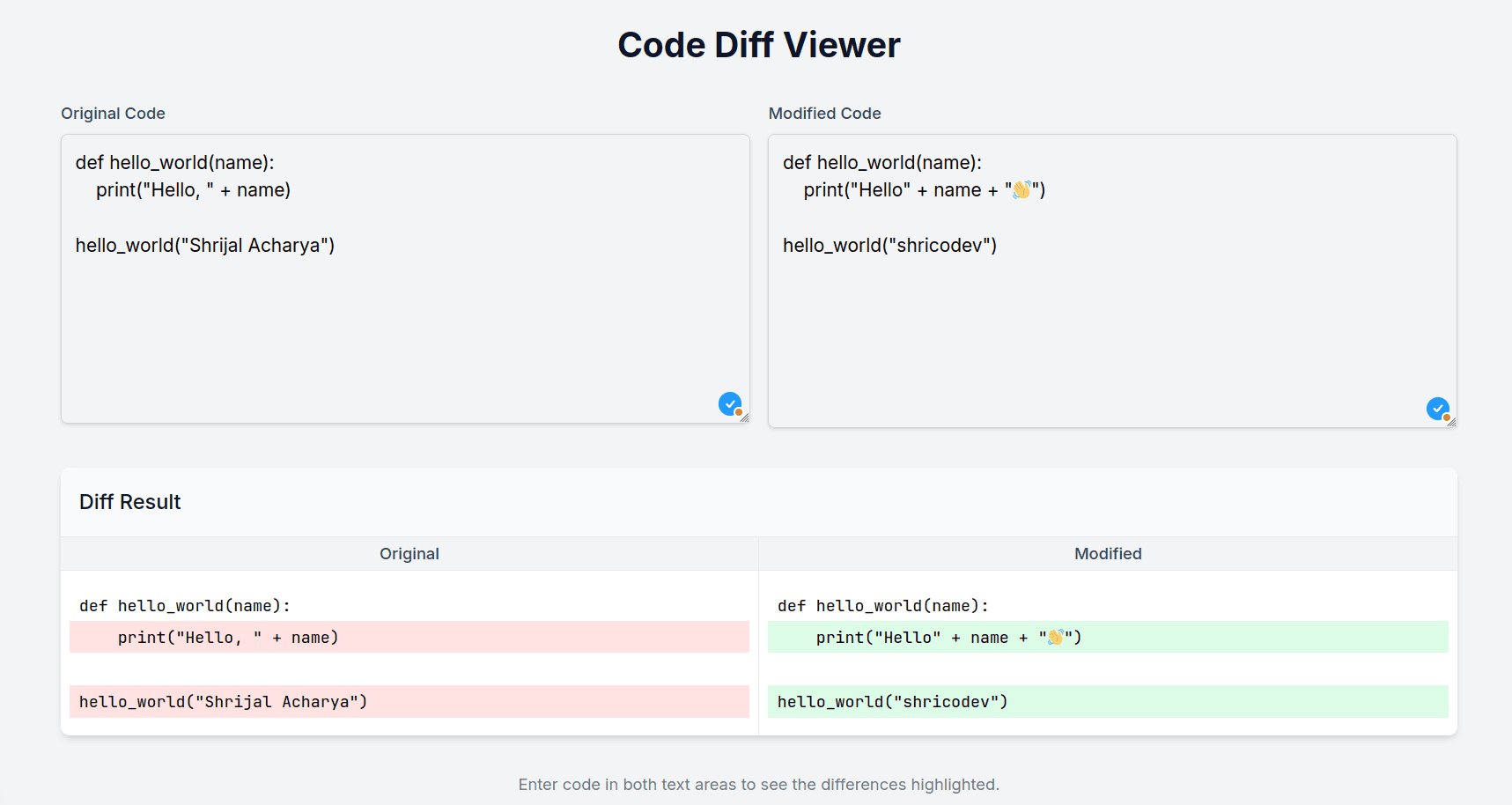
- Response from Grok 3
Here's the code it generated:
"use client";

import { useState } from "react";

function calculateDiff(text1: string, text2: string) {
  const lines1 = text1.split("\n");
  const lines2 = text2.split("\n");

  const maxLength = Math.max(lines1.length, lines2.length);
  const diff = [];

  for (let i = 0; i < maxLength; i++) {
    const line1 = lines1[i] || "";
    const line2 = lines2[i] || "";

    if (line1 !== line2) {
      diff.push({
        left: line1,
        right: line2,
        isChanged: true,
        leftClass: line1 ? "bg-red-100" : "bg-gray-100",
        rightClass: line2 ? "bg-green-100" : "bg-gray-100",
      });
    } else {
      diff.push({
        left: line1,
        right: line2,
        isChanged: false,
        leftClass: "",
        rightClass: "",
      });
    }
  }

  return diff;
}

export default function Home() {
  const [leftText, setLeftText] = useState("");
  const [rightText, setRightText] = useState("");

  const diffResult = calculateDiff(leftText, rightText);

  return (
    <div className="min-h-screen bg-gray-100 p-8 text-black">
      <div className="max-w-6xl mx-auto">
        <h1 className="text-3xl font-bold text-center mb-8">
          Code Diff Viewer
        </h1>

        <div className="grid grid-cols-2 gap-4">
          {/* Left Panel */}
          <div className="space-y-2">
            <label className="block text-sm font-medium text-gray-700">
              Original Text
            </label>
            <textarea
              className="w-full h-64 p-4 border rounded-lg font-mono text-sm resize-none focus:outline-none focus:ring-2 focus:ring-blue-500"
              value={leftText}
              onChange={(e) => setLeftText(e.target.value)}
              placeholder="Enter original text here..."
            />
          </div>

          {/* Right Panel */}
          <div className="space-y-2">
            <label className="block text-sm font-medium text-gray-700">
              Modified Text
            </label>
            <textarea
              className="w-full h-64 p-4 border rounded-lg font-mono text-sm resize-none focus:outline-none focus:ring-2 focus:ring-blue-500"
              value={rightText}
              onChange={(e) => setRightText(e.target.value)}
              placeholder="Enter modified text here..."
            />
          </div>
        </div>

        {/* Diff Viewer */}
        <div className="mt-8">
          <h2 className="text-xl font-semibold mb-4">Differences</h2>
          <div className="grid grid-cols-2 gap-1 border rounded-lg overflow-hidden">
            <div className="bg-gray-50 p-4">
              <div className="font-mono text-sm">
                {diffResult.map((line, index) => (
                  <div
                    key={`left-${index}`}
                    className={`py-1 ${line.leftClass} ${
                      line.isChanged ? "text-gray-800" : "text-gray-600"
                    }`}
                  >
                    {line.left || " "}
                  </div>
                ))}
              </div>
            </div>
            <div className="bg-gray-50 p-4">
              <div className="font-mono text-sm">
                {diffResult.map((line, index) => (
                  <div
                    key={`right-${index}`}
                    className={`py-1 ${line.rightClass} ${
                      line.isChanged ? "text-gray-800" : "text-gray-600"
                    }`}
                  >
                    {line.right || " "}
                  </div>
                ))}
              </div>
            </div>
          </div>
        </div>
      </div>
    </div>
  );
}
Here's the output of the program:
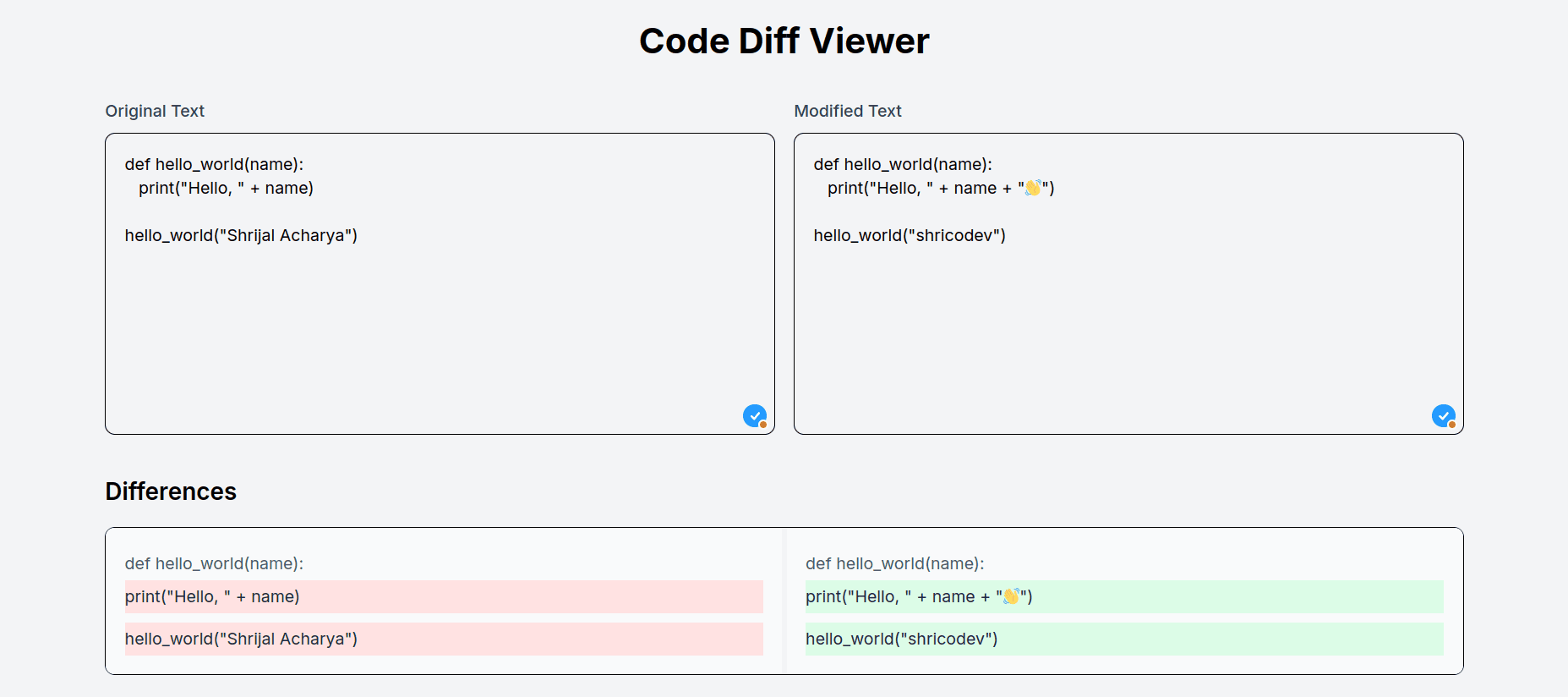
Everything else seems to be working fine with this as well, but in the diff, it is not taking the line's indentation into account.
- Response from OpenAI o3-mini-high
Here's the code it generated:
"use client";

import React, { JSX, useState } from "react";
import { diffWords } from "diff";

export default function Page() {
  // State for the two text inputs and for the computed diff result.
  const [leftText, setLeftText] = useState("");
  const [rightText, setRightText] = useState("");
  // diffResult stores an array of rows where each row is an object with two JSX elements:
  // one for the left side and one for the right side.
  const [diffResult, setDiffResult] = useState<
    { left: JSX.Element; right: JSX.Element }[]
  >([]);

  // compare the two texts line‐by‐line.
  const computeDiff = () => {
    const leftLines = leftText.split("\n");
    const rightLines = rightText.split("\n");
    const maxLines = Math.max(leftLines.length, rightLines.length);
    const results: { left: JSX.Element; right: JSX.Element }[] = [];

    for (let i = 0; i < maxLines; i++) {
      const leftLine = leftLines[i] ?? "";
      const rightLine = rightLines[i] ?? "";

      // If the lines are identical, display them as plain text.
      if (leftLine === rightLine) {
        results.push({
          left: <span>{leftLine}</span>,
          right: <span>{rightLine}</span>,
        });
      } else {
        const diff = diffWords(leftLine, rightLine);

        // For the left side, ignore the parts that were "added"
        // and highlight (with red) the parts that were "removed".
        const leftContent = diff.map((part, index) => {
          if (part.added) return null;
          return (
            <span
              key={index}
              className={part.removed ? "bg-red-200" : undefined}
            >
              {part.value}
            </span>
          );
        });

        // For the right side, ignore the parts that were "removed"
        // and highlight (with green) the parts that were "added".
        const rightContent = diff.map((part, index) => {
          if (part.removed) return null;
          return (
            <span
              key={index}
              className={part.added ? "bg-green-200" : undefined}
            >
              {part.value}
            </span>
          );
        });

        results.push({
          left: <>{leftContent}</>,
          right: <>{rightContent}</>,
        });
      }
    }
    setDiffResult(results);
  };

  return (
    <div className="min-h-screen bg-gray-50 p-8 text-black">
      <h1 className="text-3xl font-bold mb-6 text-center">
        Simple Code Diff Viewer
      </h1>

      {/* Two textareas side by side (stacked vertically on small screens) */}
      <div className="flex flex-col md:flex-row md:space-x-4">
        <textarea
          value={leftText}
          onChange={(e) => setLeftText(e.target.value)}
          placeholder="Enter left text"
          className="flex-1 p-2 border border-gray-300 rounded mb-4 md:mb-0 resize-y min-h-[200px]"
        />
        <textarea
          value={rightText}
          onChange={(e) => setRightText(e.target.value)}
          placeholder="Enter right text"
          className="flex-1 p-2 border border-gray-300 rounded resize-y min-h-[200px]"
        />
      </div>

      <div className="mt-4 text-center">
        <button
          onClick={computeDiff}
          className="px-4 py-2 bg-blue-500 text-white rounded hover:bg-blue-600"
        >
          Compare
        </button>
      </div>

      {/* Diff viewer: a grid with two columns for left and right side diff display */}
      <div className="mt-8 overflow-auto">
        <div className="grid grid-cols-2 gap-4">
          {diffResult.map((row, index) => (
            <React.Fragment key={index}>
              <div className="p-2 border border-gray-300 bg-white min-h-[40px] whitespace-pre font-mono">
                {row.left}
              </div>
              <div className="p-2 border border-gray-300 bg-white min-h-[40px] whitespace-pre font-mono">
                {row.right}
              </div>
            </React.Fragment>
          ))}
        </div>
      </div>
    </div>
  );
}
Here's the output of the program:
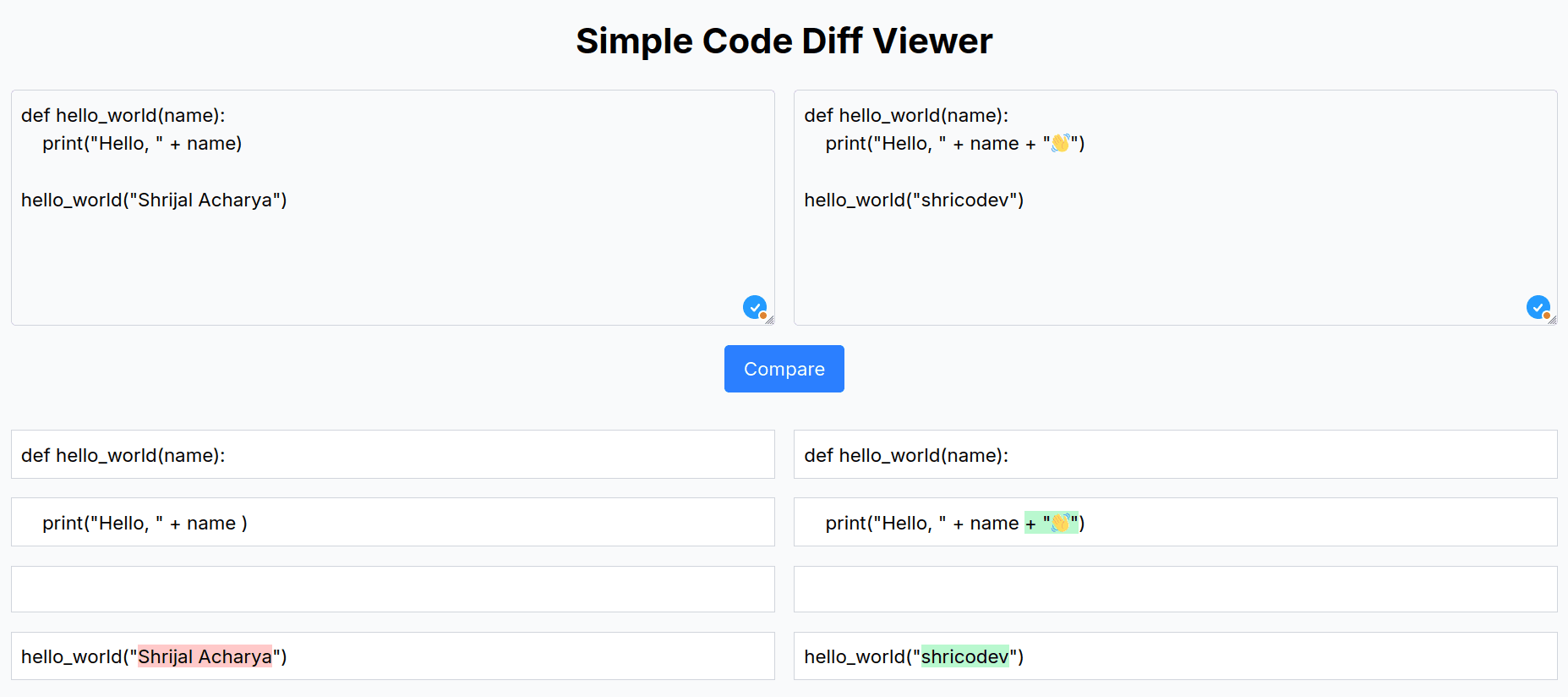
Here, we have an interesting result. It decided to use an external library diff and do highlighting per character and not per line.
Final Verdict: By functionality-wise, all three models got this problem correct (at least from testing at the surface level. There might be edge cases, though). I must say the overall code quality and output by o3-mini-high is comparatively better ✅ than both the Claude 3.7 Sonnet and Grok 3 model.
5. Manim code for Square to Pyramid Animation
Let's end our test with a final Manim question. Most LLMs pretty much suck at writing Manim code, and it gets even harder when it's a 3D scene.
Prompt: Create a Manim animation in Python where a 2D square smoothly lifts into 3D space to form a pyramid. Then, animate the pyramid shrinking back into a square.
- Response from Claude 3.7 Sonnet
Here's the code it generated:
import numpy as np
from manim import (BLUE, DEGREES, PI, UP, WHITE, Create, FadeOut, Polygon,
                   Rotate, Square, ThreeDScene, VGroup)


class SquareToPyramidAnimation(ThreeDScene):
    def construct(self):
        # Set up the scene
        self.set_camera_orientation(phi=75 * DEGREES, theta=30 * DEGREES)

        # Create a square
        square = Square(side_length=2, fill_opacity=0.7, fill_color=BLUE)

        # Show the square first
        self.play(Create(square))
        self.wait(1)

        # Prepare for 3D transformation
        # Add z-coordinate to the square's points to make it compatible with 3D
        square_3d = square.copy()
        square_points = square_3d.get_vertices()

        # Create a pyramid
        pyramid = Pyramid(square_length=2, height=2)
        pyramid.set_fill(BLUE, opacity=0.7)
        pyramid.set_stroke(WHITE, width=1)

        # The pyramid is initially hidden
        pyramid.set_opacity(0)
        self.add(pyramid)

        # Animate the square to the base of the pyramid
        self.play(
            square.animate.set_opacity(0), pyramid.animate.set_opacity(0.7), run_time=2
        )

        # Move the camera to get a better view of the pyramid
        self.move_camera(phi=60 * DEGREES, theta=45 * DEGREES, run_time=2)
        self.wait(1)

        # Rotate the pyramid to showcase its 3D nature
        self.play(Rotate(pyramid, angle=2 * PI, axis=UP), run_time=4)
        self.wait(1)

        # Animate the pyramid shrinking back to a square
        self.play(
            pyramid.animate.set_opacity(0), square.animate.set_opacity(0.7), run_time=2
        )

        # Return camera to original position
        self.move_camera(phi=75 * DEGREES, theta=30 * DEGREES, run_time=2)
        self.wait(1)

        # Finish by fading out the square
        self.play(FadeOut(square))
        self.wait(1)


class Pyramid(VGroup):
    def __init__(self, square_length=2, height=2, **kwargs):
        super().__init__(**kwargs)
        # Create the base square at z=0
        square = Square(side_length=square_length)
        square_vertices = square.get_vertices()

        # Apex of the pyramid at height above the center of the square
        apex = np.array([0, 0, height])

        # Create the faces of the pyramid
        faces = VGroup()

        # Base (the square itself)
        base = Polygon(*square_vertices, fill_opacity=0.7, fill_color=BLUE)
        faces.add(base)

        # Side triangular faces
        for i in range(4):
            v1 = square_vertices[i]
            v2 = square_vertices[(i + 1) % 4]
            face = Polygon(
                v1, v2, apex, fill_opacity=0.7, fill_color=BLUE, shade_in_3d=True
            )
            faces.add(face)

        self.add(faces)
Here's the output of the program:

- Response from Grok 3
Here's the code it generated:
from manim import (BLUE, DEGREES, ORIGIN, WHITE, Create, FadeOut, Polygon,
                   Square, ThreeDScene, VGroup)


class SquareToPyramid(ThreeDScene):
    def construct(self):
        # Set up the 3D camera
        self.set_camera_orientation(phi=75 * DEGREES, theta=30 * DEGREES)

        # Create the initial 2D square
        square = Square(side_length=2, fill_opacity=0.5, fill_color=BLUE)
        square.move_to(ORIGIN)

        # Show the initial square
        self.play(Create(square))
        self.wait(1)

        # Define the vertices of the square
        bottom_vertices = [
            [-1, -1, 0],  # Bottom left
            [1, -1, 0],  # Bottom right
            [1, 1, 0],  # Top right
            [-1, 1, 0],  # Top left
        ]

        # Define the apex of the pyramid (will rise to this point)
        apex = [0, 0, 2]

        # Create the pyramid (tetrahedron) using Polygon for faces
        pyramid_faces = VGroup()
        for i in range(4):
            face = Polygon(
                bottom_vertices[i],
                bottom_vertices[(i + 1) % 4],
                apex,
                fill_opacity=0.5,
                fill_color=BLUE,
                stroke_color=WHITE,
            )
            pyramid_faces.add(face)

        # Animation to transform square into pyramid
        # First, fade out the square while raising the apex
        self.begin_ambient_camera_rotation(rate=0.2)
        self.play(FadeOut(square), Create(pyramid_faces), run_time=2)

        # Rotate the pyramid to show 3D structure
        self.wait(2)

        # Shrink pyramid back to square
        # Create a new square for the final state
        final_square = Square(side_length=2, fill_opacity=0.5, fill_color=BLUE)
        final_square.move_to(ORIGIN)

        self.play(FadeOut(pyramid_faces), Create(final_square), run_time=2)

        # Stop camera rotation and show final result
        self.stop_ambient_camera_rotation()
        self.wait(1)
Here's the output of the program:

- Response from OpenAI o3-mini-high
Here's the code it generated:
#!/usr/bin/env python
from manim import (BLUE, DEGREES, GREEN, UP, Create, Line,
                   ReplacementTransform, Square, ThreeDScene, ValueTracker,
                   VGroup, always_redraw)


class SquareToPyramid(ThreeDScene):
    def construct(self):
        # Set an initial camera orientation so the 3D effect is clear.
        self.set_camera_orientation(phi=70 * DEGREES, theta=-45 * DEGREES)
        # Create a blue square (the base, side length = 2)
        square = Square(side_length=2, color=BLUE)
        self.play(Create(square))
        self.wait(1)

        # We'll use a ValueTracker to control the pyramid’s “apex height.”
        # When the value is 0, the apex is at the square’s center.
        # When the value is >0, the apex lifts upward (UP is the z-axis).
        height_tracker = ValueTracker(0)

        # Define a function that returns a VGroup drawing the pyramid for any given height.
        # It builds:
        #  • the base (i.e. 4 lines from the square’s corners, drawn in blue)
        #  • the 4 side edges (lines from each corner of the square up to the apex, drawn in green)
        def get_pyramid(height):
            # Get the square’s vertices (the corners); by default a Square’s vertices are ordered.
            corners = square.get_vertices()
            # Define the apex: start from the square’s center and add "height" in the upward (z) direction.
            apex = square.get_center() + height * UP
            # Create the base edges as a closed loop.
            base_lines = VGroup(
                *[
                    Line(corners[i], corners[(i + 1) % len(corners)], color=BLUE)
                    for i in range(len(corners))
                ]
            )
            # Create the side edges from each corner to the apex.
            side_lines = VGroup(
                *[Line(corner, apex, color=GREEN) for corner in corners]
            )
            return VGroup(base_lines, side_lines)

        # Create an always_redraw mobject so that whenever height_tracker changes,
        # the pyramid is redrawn with the new apex position.
        pyramid = always_redraw(lambda: get_pyramid(height_tracker.get_value()))

        # Transition from the static square (at height 0) into our pyramid object.
        # (At height=0, the side edges have zero length so the drawing looks identical to the square.)
        self.play(ReplacementTransform(square, pyramid), run_time=1)
        self.wait(0.5)

        # Animate the pyramid “lifting” by increasing the tracked height.
        self.play(height_tracker.animate.set_value(2), run_time=3)
        self.wait(1)

        # Now animate the pyramid “shrinking” back into a square by lowering the apex.
        self.play(height_tracker.animate.set_value(0), run_time=3)
        self.wait(1)

        # Optionally, perform a slight camera move to show off the 3D nature.
        self.move_camera(phi=75 * DEGREES, theta=-30 * DEGREES, run_time=2)
        self.wait(1)
Here's the output of the program:

Here, this model really struggled with the 3D projection and failed to transform the square into a pyramid.
Final Verdict: The Claude 3.7 Sonnet and Grok 3 models got it completely correct, but in terms of animation, I prefer the output from the Grok 3 model ✅. o3-mini-high failed completely and couldn't even reach the solution.
Conclusion
It's fair to say that Claude 3.7 is exactly what it claims to be. In all five questions we compared, it was the clear winner almost every time.
Tweethttps://x.com/i/status/1894094935915483577Now is no time to wait for luck. Imagine an AI model building stuffs in no time with 62.3% accuracy. Start building stuffs and improving your coding skills, or get ready to be replaced by AI (probably 🤷🏼♂️).
It doesn't necessarily mean that Claude 3.7 is the answer to everything, and there will be a time when other AI models beat this model's benchmarks.
The race between the AI models will never stop, and the game's always on!
What do you think? Let me know your thoughts in the comments below! 👇🏻
Embedded linkhttps://dev.to/shricodev